
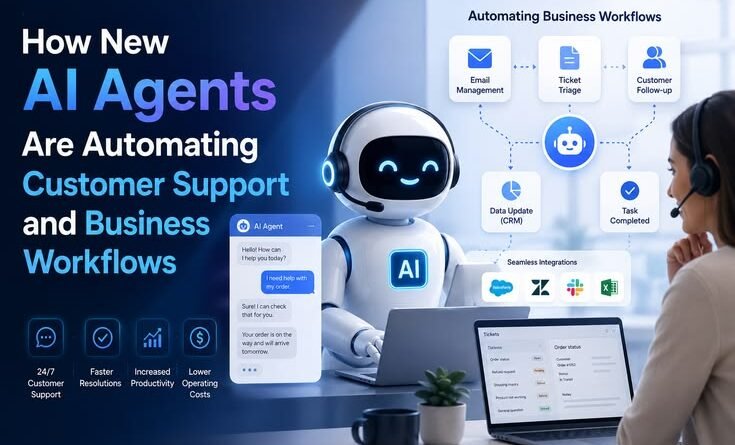
How New AI Agents Are Automating Customer Support and Business Workflows
Let an AI Agent Handle My Support Queue for 30 Days. Here’s What Actually Happened.
“Our support inbox had 847 unread messages and two burnt-out humans. I had nothing to lose by trying an AI agent. I did not expect it to work this well.”
Last October, I was running a small SaaS product with my co-founder. We had about 1,200 users and exactly zero customer support staff — just the two of us swapping tickets in between writing code, doing sales calls, and pretending we had work-life balance.
By November, the inbox had become a monster. Refund requests, password reset confusion, billing errors, feature questions — it was never-ending. A friend suggested I try an AI agent for support. I said something like, “yeah, those things are useless for anything real.” I was wrong.
That experiment changed how I think about automation entirely. And I’ve since helped three other small businesses set up similar systems. So here’s the honest, no-fluff version of what AI agents actually do for customer support and business workflows — what’s genuinely useful, what’s overhyped, and what mistakes will cost you time if you skip over them.
First, let’s be clear about what an “AI agent” actually is
I hate how this term gets thrown around. An AI agent isn’t just a chatbot with a canned FAQ. A proper AI agent can take actions — it doesn’t just answer questions, it actually does things inside other tools. It can look up a customer’s order in your database, issue a refund, update a ticket status, send a follow-up email, or trigger a workflow in your CRM — without a human clicking anything.
Think of it like hiring someone who never sleeps, never gets frustrated, remembers every policy you’ve ever written, but also — and this is important — makes mistakes when you give it bad instructions.
Quick mental model: A chatbot answers. An AI agent acts. The difference matters a lot when you’re trying to actually automate work, not just reduce the number of questions someone types to a human.
The tools that are actually doing this well right now
After testing a bunch of platforms, here’s what I’d actually recommend depending on your situation:
- Intercom Fin — Best for SaaS teams already using Intercom. Handles Tier-1 tickets surprisingly well out of the box.
- Zapier AI Agents — Great for workflow automation across tools. No-code friendly with tons of integrations.
- Make (formerly Integromat) — More powerful for complex multi-step workflows. Steeper learning curve but worth it.
- Salesforce Agentforce — Enterprise-grade. If you’re already in the Salesforce ecosystem, this is the move.
- Retool AI — Good for internal business tools. Helps ops teams build agents that connect to your own data.
- Front + AI — Email-heavy teams love this. AI drafts responses, agents triage and route automatically.
Each of these has a learning curve. But none of them require you to be a developer — which is a genuine shift from where things were even two years ago.
What AI agents are actually automating (with real examples)
1. Tier-1 customer support tickets
This is where most people start, and for good reason. About 60–70% of support tickets in most businesses are the same 20 questions — password resets, refund eligibility, “how do I do X”, shipping status, plan features. An AI agent trained on your help docs and policies handles these without breaking a sweat.
In my case, the agent resolved about 64% of tickets completely on its own in the first two weeks. No human needed. The other 36% it either escalated with a proper summary attached, or asked a clarifying question before escalating. My co-founder stopped dreading Monday mornings.
- 64% of tickets fully resolved by the agent
- Average response time dropped from 11 hours to ~4 minutes
- Zero extra headcount added
2. Internal business workflows
This is where it gets interesting — and where most blog posts stop mentioning. AI agents aren’t just for customer-facing work. I’ve seen them used to:
- Auto-summarize all customer calls and push key takeaways to Notion
- Draft and send weekly sales pipeline reports to Slack based on CRM data
- Monitor competitor pricing pages and flag changes to a shared Slack channel
- Route incoming leads to the right sales rep based on deal size, industry, and region
- Generate first-draft responses for RFPs based on past proposals
One e-commerce founder I know set up an agent that watches her Shopify returns dashboard, identifies patterns (e.g., one product SKU had a 40% return rate), and sends her a weekly digest. She caught a manufacturing defect three weeks earlier than she would have otherwise.
3. Lead qualification and follow-up
Sales teams are using AI agents to do the unglamorous but crucial work of qualifying inbound leads. The agent asks a few natural-sounding questions over email or chat, scores the lead, and either books a meeting or drops them into a nurture sequence — all automatically.
I tried this with a tool called Clay combined with an AI email layer. It wasn’t perfect on day one, but after two weeks of tweaking the prompts, our outbound response rate actually went up because follow-ups were faster and more relevant than what we were sending manually.
How to actually set one up — step by step
Here’s the sequence that’s worked for me and the businesses I’ve helped:
- Audit your most common tickets or tasks first. Spend 30 minutes going through your last 100 support tickets or your most repetitive internal tasks. Group them into categories. If 15 or more fall into the same bucket, that bucket is a candidate for automation.
- Write your knowledge base properly. This is step zero that everyone skips. The agent is only as good as what you feed it. Write clear, specific answers to every common question. Include edge cases. The vague help docs you’ve been ignoring will come back to bite you here.
- Start with one workflow, not five. Pick the single highest-volume, lowest-complexity task. Get that running well before expanding. Chasing five automations at once means five broken automations.
- Define the escalation path clearly. The agent needs to know when to give up and hand off to a human — and that threshold must be explicit. “If the customer mentions billing dispute or expresses frustration more than twice, escalate immediately” is the kind of rule you need in writing.
- Set up a feedback loop. Every resolved ticket should have a way to be reviewed. I checked 20 random agent-resolved tickets every week for the first month. You’ll catch weird responses you never anticipated.
- Measure before and after. Take a baseline of your key metrics — response time, resolution rate, customer satisfaction if you track it — before you launch. You need the before-and-after to know if this is actually working.
The mistakes I made (so you don’t have to)

Mistake #1 — Deployed the agent without testing edge cases. First week, it told a frustrated customer their refund was “not eligible” when it clearly was. Cost us a Twitter complaint.
Mistake #2 — Didn’t write escalation triggers. The agent tried to resolve a legal threat entirely on its own. It was confident. It was wrong.
Mistake #3 — Outdated knowledge base. Updated our refund policy, forgot to update the agent’s docs. It kept quoting the old policy for two weeks.
Mistake #4 — Announced it as “AI” upfront without thinking. Some customers immediately asked for a human. Now we lead with helpfulness, not the technology behind it.
Real talk: The biggest mistake is treating this as a set-it-and-forget-it solution. AI agents need maintenance. Policies change, edge cases appear, and the agent needs updating when they do. Block 30 minutes a week to review and improve.
What it genuinely can’t do (yet)
Being honest here is important. AI agents are still bad at:
- Emotionally charged situations. A customer who just lost data or had a terrible experience doesn’t want to feel like they’re talking to a script. Humans still need to handle high-emotion conversations.
- Novel problems they’ve never seen. If a bug causes a completely new type of user error that isn’t in the knowledge base, the agent will flounder or hallucinate an answer.
- Nuanced judgment calls. “Is this user eligible for an exception to our policy?” often requires context, empathy, and precedent — things agents handle poorly without very precise guidance.
- Multi-party coordination. Anything involving back-and-forth with multiple humans (e.g., scheduling something across five people with shifting constraints) still benefits from human oversight.
The sweet spot: Use AI agents to handle volume and speed. Use humans for judgment, empathy, and exceptions. The best setups pair both — agents handle the bulk, humans handle what matters most.
The unexpected benefits nobody talks about
Here’s what surprised me most. Beyond the obvious time savings, the agent created a feedback loop I didn’t anticipate. Every question it received and couldn’t answer told me something about my product — a confusing UI, a missing feature explanation, an unclear pricing page. Within a month, I had a prioritized list of product improvements driven purely by what the agent was struggling with.
Also? My co-founder got her evenings back. And that’s not nothing.
For larger teams I’ve worked with, the morale impact on support staff has been real too. Nobody got fired — instead, the humans shifted from answering “where’s my order” for the hundredth time to handling complex, interesting cases that actually require expertise. Turns out support staff prefer that. Who knew.
Is this worth it for small businesses?
Short answer: yes, if you’re handling more than 20–30 repetitive requests per week. The setup time is maybe 4–8 hours if you take it seriously. After that, even if it only automates 40% of your volume, that compounds quickly.
For bigger teams, the ROI is almost embarrassingly obvious. One mid-sized e-commerce company I consulted for reduced their support headcount growth by two people just by deploying an agent for order tracking and return requests. They didn’t fire anyone — those two planned hires just never happened.
The companies that are winning with AI agents right now aren’t the ones with the biggest budgets or the most sophisticated tech. They’re the ones who took the time to understand their own workflows first, then applied the right tools with clear rules and regular maintenance.
Start with one real problem. Solve it properly. Then build from there. That’s genuinely all there is to it.



Pingback: Why Tech Companies Are Building AI Devices That Can Understand Human Conversations Better – MSR Technical
Pingback: Why Companies Like OpenAI, Anthropic, and Meta Are Investing So Heavily in AI – MSR Technical