
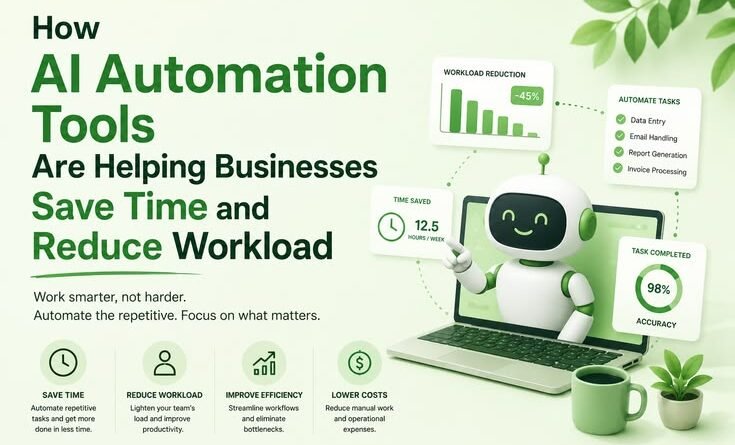
How AI Automation Tools Are Helping Businesses Save Time and Reduce Workload
yesterday I remember sitting at my desk at 11:47 PM, copy-pasting customer inquiry responses one by one into a spreadsheet. My eyes hurt. My coffee had gone cold two hours ago. And I had maybe 200 more rows to go.
That was about three years back, when I was helping a small e-commerce brand manage their backend operations. We were a team of four, trying to do the work of fifteen. Sound familiar?
That night was honestly the breaking point — the moment I started seriously looking into what AI automation tools could actually do for a business like ours. Not the hype. Not the pitch decks. The real stuff.
What I found changed how we worked completely. And I want to share what that actually looked like — the wins, the stupid mistakes, and the stuff nobody tells you upfront.
Why “Just Hire More People” Isn’t Always the Answer
The first instinct when work piles up is to bring in more hands. And sure, that works — until the budget runs out or you realize you’re spending 40% of your new hire’s time on tasks that could honestly be handled by a decent workflow tool.
The thing about repetitive business tasks — replying to routine emails, scheduling, data entry, generating reports, posting on social media — is that they’re not hard. They’re just relentless. They eat hours every day across every department. And when humans do them on repeat, errors creep in, enthusiasm drops, and burnout follows.
AI automation doesn’t replace people. But it does take those relentless tasks off their plates so they can focus on things that actually need a human brain.
The First Tool We Actually Used: Zapier
Before we touched anything fancy, we started with Zapier. If you haven’t used it — it’s basically a connector. It lets different apps talk to each other without any code. You set up “Zaps” that say things like: When a customer fills out this form → create a task in Trello → send them a welcome email → log it in our Google Sheet.
We had three of those chains running within the first week. The time saved was immediate and embarrassing — embarrassing because we’d been doing all of it manually for months like absolute rookies.
One mistake we made early on: we automated an email sequence before properly testing it. A customer got the same “Welcome to our store!” email seven times in 48 hours. She was… not thrilled. Lesson learned — always run automation in test mode for at least a week before going live.
Where Things Got Genuinely Impressive: AI Writing and Customer Support
About eight months in, we layered in some AI-powered tools for content and customer support. This is where I’d say the workload reduction became really dramatic.
We started using ChatGPT (through the API) and later Claude to handle first-draft responses to customer support tickets. The process looked like this:
- Customer email comes in
- It gets categorized automatically (refund request, shipping question, product issue, etc.)
- AI drafts a response based on a template we trained it on
- A human team member reviews and sends (or tweaks and sends)
That last step is crucial. We never let AI responses go out unsupervised — at least not in the early days. But even with human review, the time per ticket dropped from about 6-8 minutes to under 90 seconds. For a team handling 80-100 tickets a day, that’s enormous.
We also used Jasper and later Notion AI for blog drafts and product descriptions. Again — not replacing writing, but giving writers a solid starting point instead of a blank page. Output quality went up because people were editing instead of starting from scratch when already mentally exhausted.
What Surprised Me: The Tools That Helped the Most Weren’t the Flashiest
Everyone wants to talk about the big-ticket AI stuff. But honestly? Some of the highest-impact tools for us were boring ones.
Calendly — automatic scheduling with buffer times, no back-and-forth emails. Simple. Saves probably 30 minutes per person per day in coordination time.
Notion with AI — meeting summaries, auto-generated action items from notes. Meetings got shorter because the output was automated.
Make (formerly Integromat) — more complex workflow automation than Zapier, once we outgrew the simpler stuff.
Loom + AI transcription — we record internal walkthroughs and the AI transcribes them. New team members onboard faster because everything is documented automatically.
None of these are “AI” in the cinematic sense. But combined, they freed up probably 15-20 hours per week across our four-person team. That’s like getting a part-time employee for free.
A Real Step-by-Step: How to Start Automating Without Losing Your Mind
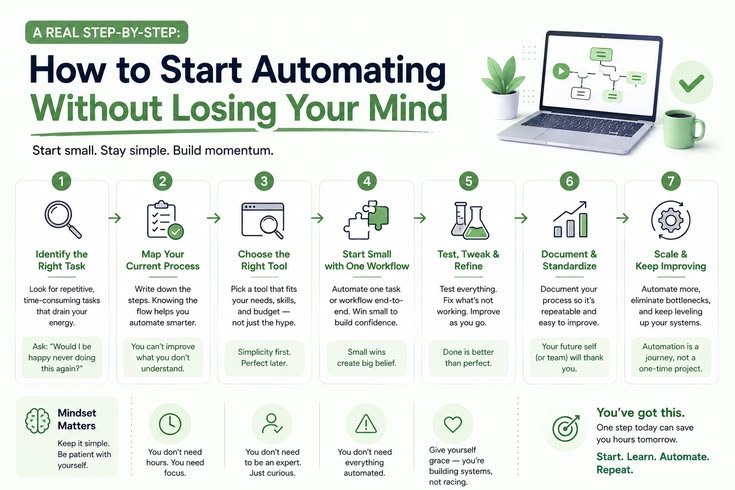
If you’re just getting into this, here’s what I’d actually recommend based on experience — not theory:
Step 1: Audit your repetitive tasks for one week. Write down everything you do more than three times a week that follows a predictable pattern. You’ll be surprised how long the list gets.
Step 2: Pick ONE process and automate it first. Don’t try to revolutionize everything at once. Pick something low-stakes — like automatically saving email attachments to a folder or sending a Slack message when a form gets submitted.
Step 3: Use Zapier or Make to connect your existing tools. You probably don’t need new software. You need your existing software talking to each other. Start there.
Step 4: Add AI to content-heavy tasks. Once your workflows are running, look at where you’re doing a lot of writing or responding. That’s where AI assistance pays off fastest.
Step 5: Review, don’t remove humans. Build in a human checkpoint for anything customer-facing. Automation handles the volume; humans handle the judgment.
Step 6: Track the time saved — seriously. Most people set up automation and forget to measure it. Track hours per task before and after. This data is gold when justifying further investment.
Common Mistakes Businesses Make With AI Automation
I’ve seen these over and over — including in my own work:
Going too fast, too broad. Trying to automate everything in month one usually results in broken workflows, frustrated teams, and a rollback to manual processes. Slow is smooth.
Not cleaning data first. AI and automation tools are only as good as the data you feed them. If your CRM is a mess, your automation will be a mess. Garbage in, garbage out.
Over-relying on AI-generated customer communication. There are moments — complaints, sensitive situations, big orders — where a robotic response is worse than a slow human one. Know where to draw the line.
Ignoring team buy-in. I’ve seen business owners implement automation tools and get zero adoption because the team didn’t understand why or how to use them. Bring people along. Explain what it does for them, not just the business.
Paying for tools they don’t use. It’s easy to stack up subscriptions. Every few months, audit what’s actually running and what’s just sitting there.
What the Numbers Actually Look Like (For Small Businesses)
I want to be honest here — I’m not going to throw out fake percentages. But what I can tell you from personal experience and conversations with other small business operators:
- A 3-5 person team can realistically recover 10-20 hours per week with well-implemented automation
- Customer support response times can drop by 60-70% with AI-assisted drafting and ticket routing
- Content output (blogs, social posts, product descriptions) can increase 2-3x without adding headcount — if the process is structured well
- Onboarding time for new employees can shrink significantly when documentation and training materials are auto-generated from recorded workflows
None of this requires a massive tech budget. A lot of it is possible with tools under $100/month total.
The Honest Reality Check
AI automation isn’t magic, and it doesn’t run itself. You’ll spend time setting things up. You’ll troubleshoot broken Zaps at inconvenient moments. You’ll occasionally have to explain to a confused customer why they got an odd automated message.
But once things are running? The shift is real. You stop spending your best hours on mechanical work. Your team focuses on decisions, creativity, relationships — the stuff that actually moves a business forward.
That late-night copy-paste session that broke me three years ago? That process now runs automatically in about four minutes, while I’m doing something else entirely.
That’s the thing nobody quite prepares you for — not just the time saved, but what it feels like to get that time back.
Start small. Pick one painful process. Automate it properly. Then build from there.
You’ll figure out the rest as you go — and honestly, that’s how everyone doing this well actually learned it.





Pingback: Why AI Search Engines Like Perplexity and Gemini Are Challenging Traditional Google Search