
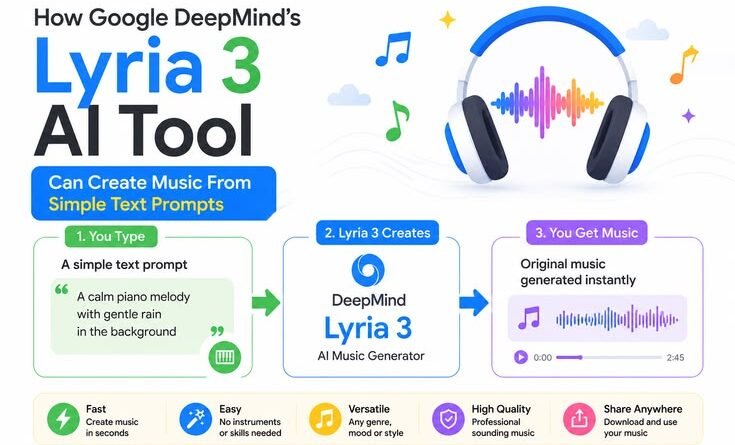
How Google DeepMind’s Lyria 3 AI Tool Can Create Music From Simple Text Prompts
When I Asked an AI to Write a Birthday Song for My Nephew — What Happened Next Surprised Me
My nephew turned 7 last month. I’d been meaning to write him something special — not just a card, but a song. Something goofy and fun with his name in it, maybe a mention of his obsession with dinosaurs. The problem? I haven’t touched a guitar in six years, I can’t carry a tune to save my life, and I absolutely cannot afford to hire a musician for a birthday ditty.
So I did what any tech-curious person would do: I opened Google’s Gemini app and typed something like “an upbeat birthday song for a 7-year-old who loves T-Rex dinosaurs, fun and silly, with clapping.”
Thirty seconds later, I was sitting there with headphones on, genuinely stunned. Not because it was perfect — it wasn’t, more on that — but because it was real music. Vocals, lyrics, a bouncy melody. My nephew’s age was literally in the chorus. I played it for him on my phone and he lost his mind.
That was my first real hands-on experience with Google DeepMind’s Lyria 3, and I’ve been going down the rabbit hole ever since.
So What Actually Is Lyria 3?
Let me give you the honest version, not the press release version.
Lyria 3 is Google DeepMind’s latest generative music model, now rolling out in the Gemini app. You describe what you want — a mood, a genre, a story, a joke — and it builds you a track complete with vocals, lyrics, and instrumentation.
One of the most striking features of Lyria 3 is its ability to produce music tracks complete with auto-generated lyrics and layered instrumentation. Users can create music through simple text prompts, such as specifying a genre, mood, or even a joke. Additionally, Lyria 3 allows for the integration of uploaded images and videos to influence the music creation process.
The standard version — the one free users get — generates 30-second tracks. If that sounds short, it is, but 30 seconds is honestly more than enough for social media clips, YouTube intros, background ambience, or yes, a chaotic dinosaur birthday jingle.
Then there’s Lyria 3 Pro — the upgraded tier that came out just six weeks later — and that’s a different beast entirely. Lyria 3 Pro creates songs up to 3 minutes long, with intros, verses, choruses, and bridges. That’s the difference between a movie trailer and an actual movie.
How to Actually Use It (Step by Step)
I know a lot of “how-to” articles are vague and hand-wavy. Here’s exactly how it works.
Step 1: Open Gemini
Head to gemini.google.com on desktop or the Gemini app on your phone. Visit gemini.google on desktop or mobile, select ‘Create music’ from the Tools menu, then describe the music you want or upload an image or video for inspiration.
You need to be 18+ to use the feature, and it’s available in several languages including English, Hindi, Spanish, French, German, Japanese, Korean, and Portuguese.
Step 2: Write Your Prompt
This is where it gets fun. You can go simple or detailed.
Simple: “a chill lo-fi track for studying”
Detailed: “an upbeat funk song with a female vocalist, around 120 BPM, celebrating a small business opening, with a chorus that repeats ‘we’re open for business'”
Both work. The detailed prompt gives you more of what you actually want, though. I’ve tested both approaches extensively at this point, and specificity is your friend.
Step 3: Try the Image/Video Upload
This one blew my mind a little. You can upload a photo, like ‘a comical R&B slow jam about a sock finding their match’ and in a matter of seconds, Gemini will translate it into a high-quality, catchy track.
I uploaded a photo of a sunset over a lake and asked for “an ambient track that matches this vibe.” The result was genuinely cinematic — soft synths, a light piano melody, very peaceful. I’ve used it as background music on a few video calls since.
Step 4: Download and Share
Download generated tracks as high-quality MP3 audio or MP4 video with cover art. Share directly to social platforms or use in ProducerAI workflows.
Simple, clean, done.
What Lyria 3 Pro Does Differently
If you’re a Gemini subscriber (AI Plus, Pro, or Ultra tier), you get access to Lyria 3 Pro, and the jump in capability is significant.
Lyria 3 Pro is the premium tier of the Lyria 3 generation. It offers longer output duration, more detailed structural control, and higher audio quality compared to the standard Lyria 3 model.
The big deal here is song structure. When prompting Lyria 3 Pro, you can specify which song sections to include and in what order. Supported sections include: Intro — instrumental or vocal setup that establishes the vibe before the main content; Verse — narrative or melodic content that carries the main lyrical story; Pre-chorus — optional build section that creates tension before the chorus; Chorus — the main hook, typically more energetic and repeated multiple times; Bridge — a contrasting section that breaks the repetition and adds dimension; Outro — closing section that winds the song down.
That’s a full song, not a clip. I prompted it with “cinematic lo-fi hip-hop with orchestral strings — verse, chorus, verse, chorus, bridge, chorus, outro” and it actually followed that structure. The bridge hit at roughly the right moment, the outro faded naturally. I had to listen twice because I kept expecting it to just collapse into noise.
My Honest Mistakes and What I Learned

Alright, here’s the stuff nobody tells you.
Mistake 1: Being too vague
My first few prompts were things like “make a cool song” or “something jazzy.” The results were… fine. Forgettable. The model needs context to do something interesting. Think about what a music brief to an actual musician would look like — tempo, mood, instruments, what the song is for — and build your prompt around that.
Mistake 2: Expecting it to sound exactly like a specific artist
If your prompt names a specific artist, Gemini will take this as broad creative inspiration and create a track that shares a similar style or mood. So don’t type “make something exactly like [Artist Name]” and expect a clone. You’ll get inspired-by, not a copy. Honestly, once I stopped trying to recreate things I already knew, I started getting more interesting results.
Mistake 3: Not iterating
The first result is rarely the best one. I’d generate five or six versions of the same prompt, tweak one word, change the tempo description, adjust the vocal style. The model’s output varies each time, and sometimes version four is dramatically better than version one for reasons that aren’t totally obvious. Treat it like a creative conversation, not a vending machine.
Mistake 4: Assuming it replaces production software
Lyria 3 Pro doesn’t let you hand-edit MIDI or arrange stems manually within the interface. You’re still working with a text-to-music paradigm — you prompt, it generates, you listen, you iterate. If you need stem separation, manual EQ, or precise beat-level control, you’d take the output into a tool like Ableton or Logic Pro for that work.
Think of Lyria as the sketch pad, not the final canvas. For casual use, the output is more than good enough as-is. For professional production, it’s a starting point.
Where It Actually Shines
After weeks of using this thing, here are the cases where Lyria 3 genuinely makes your life easier:
Content creators and YouTubers — Background music for videos is a constant headache. Royalty-free libraries are either expensive or full of the same five loops everyone else uses. Lyria lets you generate something bespoke in 30 seconds. Done.
Social media managers — Need a quick Reel or TikTok with a custom track? Upload your video still, describe the vibe, and you’ve got a matching soundtrack faster than you can browse a stock music site.
Indie game developers — Vertex AI gives organizations the ability to scale high-fidelity production, from rapidly generating bespoke soundtracks for gaming to integrating into creative tools.
Podcasters and educators — Custom intros and outro music without licensing fees or awkward library loops.
People like me — Who just want something fun and personal that they couldn’t otherwise create.
The Responsible AI Angle (Worth Knowing)
Google has put real thought into the ethical side of this, and it shows. All tracks are imperceptibly watermarked with SynthID technology, allowing you to detect whether music has been created or edited using AI.
Music generation with Lyria 3 is designed for original expression, not for mimicking existing artists. Google also has filters in place to check outputs against existing content.
And the training data? Google has been very mindful of copyright and partner agreements as they’ve trained Lyria 3, using materials that YouTube and Google has a right to use under their terms of service.
Is it perfect? No — copyright in AI music is still a messy, evolving space across the whole industry. But compared to some competitors, Google’s transparency here is notable.
What I’d Tell Someone Just Starting Out
Don’t overthink the first prompt. Just try something you actually care about — a song for your dog, a theme for your work presentation, a track that sounds like a rainy afternoon in a coffee shop. The barrier to entry is genuinely zero. You don’t need music theory, you don’t need equipment, you don’t need anything except a Gemini account and an idea.
Then start getting specific. Add tempo. Mention instruments. Describe the feeling, not just the genre. Tell it whether you want vocals or just instrumentals. The more you give it to work with, the more interesting the output.
And then iterate. A lot. That’s where the magic actually lives — not in the first click, but in the back-and-forth of refining something until it surprises you.
That birthday song for my nephew? The fourth version was the one. He’s listened to it probably 200 times since. I’m counting that as a win.
A Quick Look at What’s Coming
Lyria 3 Pro is now available in Vertex AI, Google AI Studio, the Gemini API, Google Vids, the Gemini app, and ProducerAI, so you can scale music production and experiment with different styles.
The ecosystem is expanding fast. Lyria RealTime unlocks the world of real-time music generation, allowing anyone to interactively create, control, and perform music in the moment. You can steer, shape, and warp the music — all in real-time. Blend multiple text prompts to mix genres, change instruments, and alter the mood of the music.
That real-time version is particularly wild — imagine a live DJ set where the “DJ” is an AI you’re steering with text commands. It’s not fully mainstream yet, but it’s happening.
If you’ve been sitting on the fence about trying AI music tools — thinking they’re just gimmicks or too complicated or not for someone without a music background — Lyria 3 is the one that might actually change your mind. I went in skeptical and came out with a song my nephew loves. That’s a good enough result for me.
Tried Lyria 3 yourself? Drop what prompt worked best for you in the comments — I’m genuinely curious what people are creating with it.