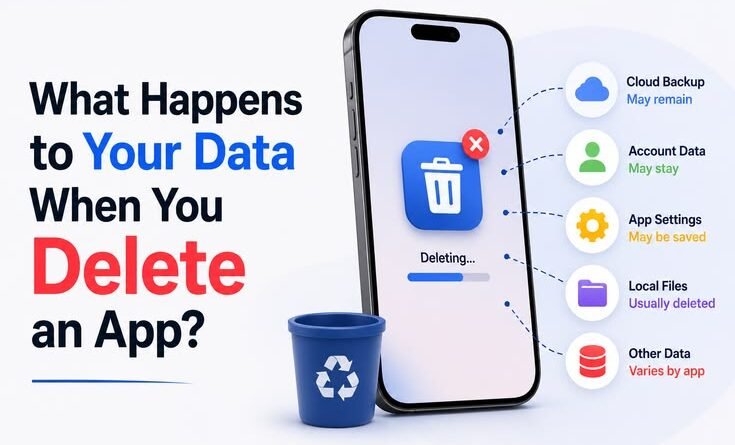
What Happens to Your Data When You Delete an App?
Here’s the full article — written in a natural, human voice:
What Happens to Your Data When You Delete an App?
Last year, I went on a bit of a phone cleanse. You know that moment when you scroll through your apps and realize you’re paying for things you haven’t opened in eight months? I deleted somewhere around thirty apps in one sitting — fitness trackers, food delivery services, random games, a meditation app I used exactly twice. Felt great. Freeing, even.
Then, about a week later, I got a promotional email from one of those apps. Then another. Then a password reset notification from a service I had completely wiped off my phone. That’s when it hit me — deleting the app from my phone and actually getting rid of my data are two very different things. And honestly, most people don’t realize this until something like that happens to them.
Deleting the App Is Just the Beginning
Here’s the thing nobody tells you clearly: when you delete an app, you’re only removing the software from your device. The icon disappears. The storage frees up. But the company that made that app? They still have everything you gave them — your name, email, browsing habits, location history, payment info, whatever you typed in while using it.
Think of it like this. Deleting an app is like leaving a restaurant. You walk out the door, you’re gone — but the restaurant still has your credit card info on file, your reservation history, and maybe even a note from the waiter about your usual order.
The app is just a door. Your data lives in their servers, not on your phone.
What Kind of Data Are We Actually Talking About?
Depending on the type of app, the data stored can be pretty extensive:
A food delivery app like Zomato or Swiggy holds your address, your order history, your payment method, and your search patterns. A fitness app like Google Fit or Strava stores your workout routes, health stats, and sometimes your sleep data. Social apps like Instagram or Snapchat have photos you uploaded, messages, search history, and behavioral patterns that feed their algorithms.
Even seemingly harmless apps — flashlight utilities, weather checkers, simple games — often request permissions for your contacts, location, or device ID. That data doesn’t vanish the moment you uninstall.
What Happens on iOS vs Android
The behavior is slightly different depending on your platform, and this matters.
On iPhone (iOS), when you delete an app, the app data stored locally on your phone is removed along with it — unless you have iCloud backup enabled, in which case some app data might be backed up and synced. But again, the company’s servers are untouched.
On Android, the situation can be similar, but some apps store data in places that survive an uninstall. Residual files in shared storage, cached data, or data stored via third-party SDKs can sometimes linger. And just like iOS, nothing server-side disappears.
One thing I started doing: before deleting an app, I go into Settings > Apps > [App Name] and manually clear data and cache. On Android, this is actually a separate option from uninstalling. It doesn’t erase the server-side stuff, but it does clean up what’s sitting on your phone.
The Real Question: How Do You Actually Delete Your Data?
This is where most people stop short. They delete the app and assume the job is done. It’s not.
To truly remove your data, you need to delete your account — and not just from inside the app. Here’s what the process usually looks like:
Step 1: Find the account deletion option. Some apps make this easy — it’s right in Settings > Account > Delete Account. Others hide it so well you’d think it doesn’t exist.
Step 2: If you can’t find it, go to the website. Many apps only allow account deletion through their website, not the mobile app. Open a browser, log into your account, and look in account settings or privacy settings.
Step 3: Look for a data deletion request. In regions covered by GDPR (Europe) or CCPA (California), companies are legally required to let you request data deletion. Even if you’re not in those regions, many companies offer this globally now. Look for a “Delete My Data” or “Right to Erasure” request form.
Step 4: Check for a confirmation email. After submitting a deletion request, you should receive a confirmation. Save it. If you don’t get one within a day or two, follow up.
Step 5: Wait. Most companies have a grace period — usually 30 to 90 days — before data is permanently deleted. During this time, your account is deactivated but the data technically still exists on their servers.
Apps That Make It Unnecessarily Hard
Let me be real with you — some apps are deliberately designed to make account deletion difficult. This is sometimes called a “roach motel” design pattern: easy to get in, hard to get out.
I spent twenty minutes once trying to delete an old account on a gaming platform. The option was buried inside a support FAQ, and I had to submit a ticket to customer service and wait for a human to process it. Meanwhile, another app I tried to leave sent me three “Are you sure?” screens and a guilt-trip email offering a discount if I stayed.
If you run into this, a useful trick is to search “[App Name] delete account” on Google. Sites like JustDeleteMe (justdeleteme.xyz) actually rate how hard it is to delete an account from hundreds of services. It’s a genuinely useful resource.
Third-Party Data Brokers: The Part Nobody Talks About
Here’s where it gets messier. Many apps share or sell data to third-party advertisers, data brokers, or analytics companies. So even if you delete your account with the original app, your data might already be living in five other places you’ve never heard of.
Data brokers like Acxiom, Experian, or smaller outfits buy and aggregate data from apps, loyalty programs, and other sources. They build profiles on you and sell them to marketers, insurers, employers — really anyone willing to pay.
This is genuinely hard to fully control, but here’s what you can do:
Some services like DeleteMe or Privacy Bee will scan and submit removal requests to hundreds of data brokers on your behalf. They’re paid services, but useful if you’re serious about your digital privacy. If you want a free route, you can manually opt out of many data brokers — it’s just very time-consuming. The Privacy Rights Clearinghouse has a directory of brokers and their opt-out links.
A Mistake I Made (So You Don’t Have To)
When I switched phones a couple years back, I did a factory reset on my old device and figured that cleared everything. But I hadn’t actually deleted any of my app accounts. All that data was still sitting on company servers, and most apps let you log back in and pick up exactly where you left off — new phone, old data, old behavioral profile, everything intact.
The lesson: a factory reset wipes your local device. It does nothing to your accounts or your data stored on remote servers. Always think of these as two separate things.
When You Want to Keep the App But Limit What It Holds
Sometimes you don’t want to delete an app entirely — you just want to trim back what it knows about you. Here are a few things worth doing:
Go into your phone’s privacy or app permissions settings and revoke any permissions the app doesn’t strictly need. Location access for a recipe app? Off. Contacts access for a shopping app? Absolutely not.
On iPhone, Settings > Privacy & Security lets you manage this cleanly. On Android, Settings > Privacy > Permission Manager does the same.
Also, periodically log into apps and go through their data or privacy settings. Many apps now let you download a copy of your data (under GDPR, this is called a Subject Access Request). It’s eye-opening to see exactly what they have on you — and sometimes it’s enough to make you want to delete the account entirely.
The Practical Takeaway
Deleting an app is a small act. Deleting your data requires intentional follow-through.
The short version: uninstall the app, delete your account from the service’s website or settings, submit a data deletion request if available, and check for a confirmation. For apps you’ve used for years — especially health, finance, or social apps — this is genuinely worth the extra ten minutes.
Your data sitting on some server you forgot about isn’t going to ruin your life, but it’s also not nothing. It can be leaked in a breach, sold to advertisers, or used to build a profile you never consented to. A little housekeeping now and then goes a long way.
And honestly? Going through this process made me a lot more selective about which apps I give my information to in the first place. That might be the best side effect of all.