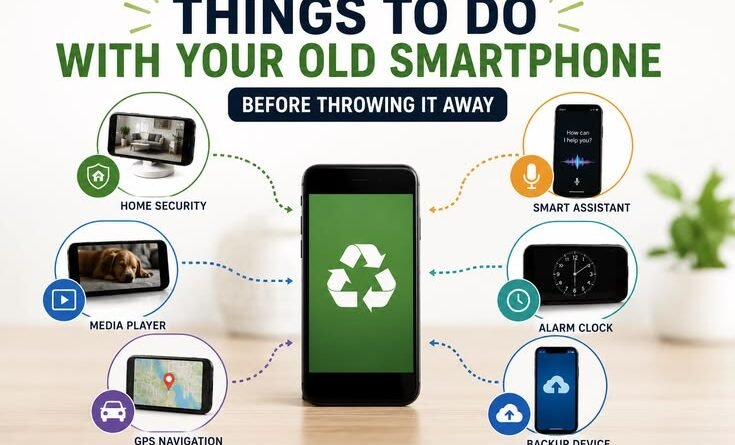
Things to Do With Your Old Smartphone Before Throwing It Away
Last year, I opened my desk drawer and found three old smartphones just sitting there — a cracked Redmi, a slow Samsung Galaxy, and an iPhone 7 that I kept “just in case.” None of them were my daily drivers. All of them were gathering dust. I kept telling myself I’d figure out what to do with them later, and “later” turned into two years.
Then one day my wife needed a dedicated GPS device for her car. I thought, wait — why am I buying something new when I have perfectly good hardware right here? That started a deep dive into what you can actually do with an old phone before tossing it. And honestly, the list surprised me.
So if you have an old phone lying around — or you just upgraded and you’re wondering what to do with the previous one — read this before you throw it in a box, sell it for peanuts, or worse, chuck it in the bin.
First, Do This Before Anything Else
Before you repurpose, sell, donate, or recycle your old phone, there’s some housekeeping you absolutely can’t skip. I learned this the hard way when I handed off a phone to my cousin without wiping it properly. He could still see some of my old WhatsApp backups. Awkward.
- Back up everything — photos, contacts, app data. Use Google Photos, iCloud, or just plug it into your laptop and copy what matters.
- Sign out of all accounts — Google, Apple ID, Samsung account, WhatsApp, banking apps, everything. Don’t just delete the apps.
- Remove your SIM and any microSD card.
- Do a factory reset. On Android: Settings → General Management → Reset → Factory Data Reset. On iPhone: Settings → General → Transfer or Reset iPhone → Erase All Content.
- If you’re selling it, check that the previous owner lock (FRP or Activation Lock) is fully cleared before handing it off.
Quick tip: For iPhones, go to iCloud.com and remove the device from your account before the reset — otherwise the next person will hit Activation Lock during setup.
Turn It Into a Dedicated Smart Home Controller
This is hands-down one of the most practical things I’ve done with an old phone. I mounted my old Redmi on the wall near our main switchboard and turned it into a permanent smart home dashboard. It runs Google Home full-time, controls our lights, fans, and AC, and never leaves its charging spot.
The best part? It’s always charged, always on, and never gets tied up with calls or notifications. Apps like Google Home, Amazon Alexa, or Apple Home work great for this. If you have smart bulbs, plugs, or an AC with a WiFi adapter, this setup is genuinely useful and costs nothing extra.
Use It as a Dedicated GPS and Navigation Device
This is exactly what I did with the iPhone 7. Mounted it on a phone holder in our second car, downloaded Google Maps and Maps.me (which works offline — super important on highways where signal drops), and now we have a dedicated navigation device that doesn’t drain the driver’s phone battery.
If you do a lot of road trips or drive in areas with patchy signal, having offline maps on a dedicated device is genuinely useful. OsmAnd is another great offline maps app, especially for rural areas.
Make It a Baby Monitor or Security Camera
I didn’t try this personally until a friend showed me her setup — she was using an old OnePlus as a nursery monitor. The app she used was Alfred Camera, which is free and works surprisingly well. You install it on both the old phone (as the camera) and your current phone (as the viewer), and you can watch the live feed from anywhere with internet.
For a slightly more serious security setup, apps like AtHome Camera or IP Webcam (Android) let you turn the phone into a proper network camera. You can even hook it up to NVR software if you want to go that far. I set up one old phone pointed at our front door — not a full security system, but enough to check who’s ringing the bell while I’m in another room.
Give It a New Life as a Kids’ Device
This is one of the most popular things people do — and for good reason. Load up a few educational apps (Khan Academy Kids, Duolingo, Reading Eggs), set up parental controls, and you’ve got a device your kid can use without touching your phone. Since there’s no SIM in it, you control when it has internet access via your WiFi router.
On Android, Google Family Link works even on older phones. On iPhones, Screen Time does the same job. I set this up for my nephew and it works brilliantly — he has YouTube Kids, a couple of puzzle games, and nothing else. And if he drops it and cracks the screen, it’s not the end of the world.
Heads up: Make sure you create a separate Google or Apple account for the child, not just a restricted profile. This gives you proper parental controls and prevents them from accessing your personal data or purchase history.
Turn It Into a Dedicated Music or Podcast Player
My old Samsung Galaxy now lives in the kitchen, permanently connected to a Bluetooth speaker. It runs Spotify, has a playlist pre-loaded, and never needs to be touched. No calls, no notifications, no interruptions. It’s just a music machine.
If you listen to a lot of podcasts during commutes, loading up Pocket Casts or Spotify on a separate device and using it just for audio is genuinely nice. Your main phone battery thanks you for it.
Sell It, Trade It In, or Donate It
If you don’t have a personal use for it, don’t let it rot in a drawer. There are real options:
- Sell it on OLX, Cashify (in India), or eBay depending on where you are. Even a five-year-old phone in working condition gets you something.
- Trade it in directly at a brand store — Samsung, Apple, and Xiaomi all have buyback or trade-in programs. You usually get a discount on your next purchase.
- Donate it to a school, NGO, or someone who needs it. During the pandemic, there were students who didn’t have a device for online classes. A working old phone is genuinely valuable to someone.
- Check if your city has an e-waste collection program. Many local governments and brands now run drives where you can responsibly drop off old electronics.
Don’t underestimate what an “old” phone is worth to someone who doesn’t have one at all.
Use It for Testing Apps or Experimenting
If you’re into tech or development, an old phone is a great sandbox. I’ve used mine to test apps before recommending them, flash a custom ROM just to see how LineageOS runs, and try out different launcher setups without messing with my daily phone. It’s also useful for testing how an app behaves on older hardware — a real-world performance test that an emulator can’t fully replicate.
Even if you’re not a developer, it’s a good device to try out a new launcher like Nova or a different Android skin without any risk.
Mistakes to Avoid
- Not wiping the phone before giving it away. Even a factory reset might not be enough on some older Android versions — look up the specific process for your model.
- Forgetting to sign out of iCloud before selling an iPhone. The buyer won’t be able to set it up at all, and you’ll get an angry message later.
- Selling too late. A phone loses value fast. If you upgraded 18 months ago and still haven’t sold the old one, the window is closing.
- Throwing it in regular trash. E-waste has toxic materials — lithium batteries, heavy metals — that shouldn’t go in a landfill. Please recycle it properly.
- Assuming it’s worthless just because you don’t want it. Someone, somewhere, will find real use in it.
One Last Thing
Old phones have a weird way of still being useful long after you stop using them as phones. The camera still works. The screen still works. The battery — okay, the battery might be a bit rough — but with a USB cable nearby, most of these repurposed uses work just fine.
I currently have that old iPhone 7 running navigation in the car, the Redmi on the wall as a smart home controller, and the Samsung Galaxy in the kitchen blasting music. None of them are “phones” anymore. They’re just dedicated tools that cost me nothing extra.
Before you toss or forget about that old device, spend ten minutes thinking about what you actually need in your daily life. There’s a decent chance your drawer is hiding the solution.