What Is an NPU in a Smartphone and Does It Actually Matter?
Still I remember the first time someone mentioned an NPU to me. I was at a phone launch event, half-listening to a presenter rattle off specs, when they said something like “…and with our dedicated Neural Processing Unit, on-device AI tasks run 4x faster than the competition.” The crowd nodded. I nodded. And then I quietly googled what an NPU actually was on my way home.
That was a few years back. Since then, I’ve gotten genuinely curious — not in a spec-sheet way, but in a “wait, does this actually change how I use my phone?” way. And after using phones with wildly different chipsets, comparing results, and falling into more than a few rabbit holes, I think I finally have an honest answer.
So First, What Even Is an NPU?
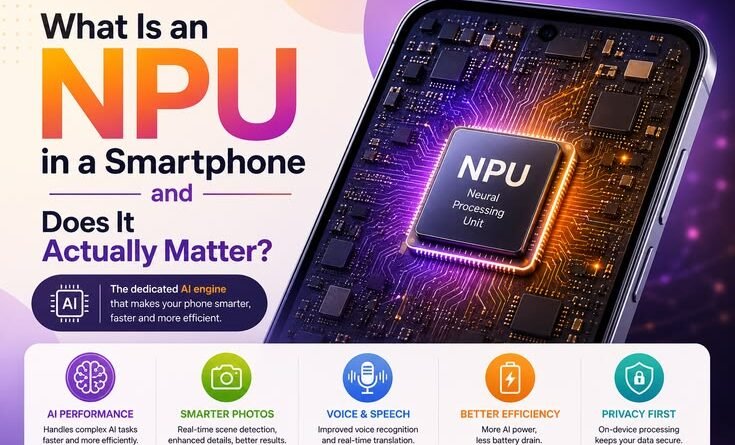
Without going all Wikipedia on you — an NPU, or Neural Processing Unit, is a dedicated chip inside your smartphone’s main processor that’s specifically designed to handle AI and machine learning tasks.
Your phone already has a CPU (the brain for general tasks) and a GPU (handles graphics). The NPU is a third player that takes over whenever your phone needs to do something “intelligent” — like recognize your face, understand your voice, enhance a photo, or translate text in real time.
The key word there is dedicated. Instead of your CPU struggling through a million calculations to figure out what’s in a photo, the NPU handles it natively — faster, and without draining your battery nearly as much.
Qualcomm calls theirs the Hexagon NPU. Apple has the Neural Engine inside their A-series and M-series chips. Samsung’s Exynos chips have one. MediaTek’s Dimensity chips have one. Basically every flagship — and increasingly mid-range — phone has some version of it now.
The First Time I Actually Felt the Difference
Here’s a real moment that made it click for me.
I was testing two phones side-by-side — a budget Android running a basic MediaTek chip and a mid-ranger with the Dimensity 9200. Both had 12GB RAM, both looked fine on paper. I was shooting in a dimly lit restaurant (classic bad lighting test), and I took the same shot on both.
On the budget phone, Night Mode took about 4-5 seconds to process, the phone got slightly warm, and the result was… fine. Acceptable.
On the Dimensity phone, the same shot processed in under a second. The phone stayed cool. And the result — better exposure, sharper details, less noise — was noticeably better.
Same scene. Same megapixel count. Very different experience.
That’s the NPU doing its job. It’s not magic. It’s just a chip that’s been trained specifically to recognize what “good lighting” looks like and make adjustments faster than a general-purpose processor ever could.
What Does the NPU Actually Do Day-to-Day?
This is where it gets interesting, because the NPU isn’t just for camera nerds. Here’s where you’re actually relying on it without realizing it:
1. Camera Processing This is the big one. Portrait mode blur, HDR processing, Night Mode, object recognition (the little tags that appear when you’re near food or landmarks) — all of this runs through the NPU. Phones with stronger NPUs produce better results faster and with less heat buildup.
2. Face Unlock When you lift your phone and it unlocks before you’ve even consciously looked at it — that’s the NPU mapping your face in real time and comparing it against a stored model. On weaker chips, you notice a half-second delay. On something like an iPhone 15 Pro or Pixel 8, it feels instantaneous.
3. Voice Assistants and On-Device Processing Google’s Pixel phones have been doing something clever for a few years — running parts of Google Assistant entirely on-device instead of sending your voice to a server. This makes responses faster and works even without internet. That’s only possible because the Tensor chip (Google’s own silicon) has an NPU capable of handling speech recognition locally.
4. Real-Time Translation If you’ve used the Live Translate feature on a Pixel or Samsung phone, you know how impressive it is when it works. Real-time voice translation during a call, or instant camera translation of a menu in another language — that computation is happening on your phone, not in the cloud, because the NPU is doing the heavy lifting.
5. Predictive Text and Keyboard Suggestions Honestly? I didn’t realize how much of my keyboard’s autocorrect was NPU-dependent until I tested a phone with a weaker processor. The suggestions felt sluggish and generic. On a Pixel or iPhone, the predictions feel almost eerily personal because the model has learned your patterns locally.
6. Photo Sorting and Search Open Google Photos and search “birthday cake 2022” — it finds it in seconds. That object recognition runs on the NPU. Same with Apple’s Photos app understanding scenes, faces, and moments.
Does the NPU Actually Matter for Regular Users?

Here’s my honest take: it depends on what you do with your phone.
If you mostly scroll social media, send texts, and occasionally take photos in good lighting — you probably won’t notice a dramatic difference between a strong NPU and a weak one. The experience will feel fine either way.
But if you’re someone who:
- Uses your camera constantly, especially in tricky lighting
- Relies on voice commands or voice-to-text heavily
- Edits videos directly on your phone
- Uses real-time translation features
- Wants AI-powered features to actually feel smooth and not janky
…then yes, the NPU matters. A lot, actually.
I’ve seen people spend months frustrated by laggy portrait mode or a face unlock that doesn’t work half the time, without ever connecting it to the chip inside their phone. They blame the camera app, or the software, or assume “phones are just like this.” They’re not. A capable NPU makes those features feel finished rather than experimental.
The Battery Angle (This One Surprised Me)
One thing I genuinely didn’t expect: a better NPU actually saves battery life.
Here’s why. When your phone has to use the CPU for AI tasks (because the NPU isn’t capable enough), it burns a lot more energy. The CPU is like using a sledgehammer to crack a walnut. The NPU is designed exactly for that walnut.
I ran an informal test over a week — same usage pattern, two phones. The one with the more capable NPU (Snapdragon 8 Gen 2) consistently lasted 15-20% longer on heavy-use days that included a lot of camera use and Google Translate. Not a placebo. The efficiency gap is real.
Common Mistakes People Make When Thinking About NPUs
Assuming it only matters on flagships Not anymore. MediaTek’s mid-range Dimensity chips have decent NPUs now. Even phones in the $300-400 range are getting usable neural processing. It’s not just a premium feature.
Confusing NPU performance with camera hardware I’ve seen people buy a phone because it has a high megapixel count, then be disappointed by the photos. Megapixels are almost irrelevant now. The computational photography running on the NPU is what separates average shots from great ones.
Ignoring it entirely because it sounds too technical This is the other extreme. Some people see “NPU” in a spec sheet and skip right past it because it sounds like marketing fluff. It’s not. If two phones are otherwise similar and one has a clearly superior NPU (you can usually check benchmarks on sites like AnandTech or Notebookcheck), the experience difference is tangible.
Expecting the NPU to fix bad software A great NPU can’t rescue a poorly optimized camera app or buggy software. This is why Google’s Pixel phones punch above their hardware weight — the software is tuned exceptionally well to work with the Tensor chip. The whole system matters.
What to Look For When Buying
You don’t need to memorize chip specifications. Just a few practical things:
- Check reviews that specifically test camera processing speed — GSMArena and MKBHD’s video reviews usually cover this
- Look for on-device AI features — if the phone supports offline translation, local voice commands, or local photo processing, it’s a sign the NPU is capable
- Benchmark sites matter here — AI benchmarks on sites like CPU Monkey or AnandTech give you a rough sense of relative NPU performance
- Stick to the main chipset families — Snapdragon 7-series and above, Dimensity 8000-series and above, Apple A15 and above, Google Tensor G2 and above all have NPUs worth caring about
Where Things Are Heading
Honestly, the NPU arms race is just getting started. With on-device LLMs becoming a real thing — Samsung’s Galaxy AI features, Apple Intelligence on iPhone 16, Google’s Gemini Nano running locally on Pixels — the NPU is becoming the critical piece of hardware that separates phones that feel current from phones that feel like they’re playing catch-up.
Apple’s been ahead of this curve for years, quietly building Neural Engine performance with every chip generation. Qualcomm and MediaTek are catching up fast. The next two or three years are going to make NPU performance matter even more than it does today.
My Honest Bottom Line
The NPU isn’t a marketing gimmick — but it’s also not something you need to obsess over unless you’re choosing between phones. What it does is make smart features feel actually smart instead of slow and half-baked.
The best way I can put it: a powerful NPU is the difference between a feature that you use daily because it just works, and a feature you tried once, thought “meh,” and never touched again.
Next time you’re impressed by how fast your phone unlocked, or how good a low-light photo turned out, or how smoothly live translation worked — there’s a tiny, highly specialized piece of silicon you can silently thank for that.